Hacking together a solution
After digging through the mess that is Evolve’s settings and style options, I eventually decided that the easiest way to solve some of our common issues was to add custom CSS to the projects.
CSS is programming language for the web that is one of the simplest ways to take what is on screen and make styling adjustments to it. Unfortunately, Evolve doesn’t support adding CSS or any other code to the courses. So this meant deciding whether it was worth the risk to do so and figuring out how to minimize that risk.
I also found that some issues we were facing couldn’t be solved by CSS alone, they needed JavaScript. Thankfully, the solution that seemed most robust for including CSS also made hacking in JavaScript just as feasible and no greater a risk.
Why doesn’t Evolve support this?
When using CSS or JavaScript to manipulate elements on the page, you access those elements by referring to their class or id names. You also make assumptions about each elements current functionality and setup before modifying it to suit your needs.
This means that if someone writes custom code to manipulate elements in their course, an update to Evolve could, at any time, break that custom code and thus break the course.
ie. If Evolve changes the classname of a component you’ve customised, then the CSS or JS you wrote to manipulate it will no longer work.
This isn’t the only approach for software architects to take when building software like Evolve, though, many services out there allow users to add in CSS (and sometimes even JS), regardless of the risk — The mindset being that if you choose to add this kind of code, you are aware of the risk and prepared to monitor for any issues that may arise. It’s the architects recognising their software has its limitations, and putting in a loophole just in case anyone ever really needs it.
Another approach would be to specifically support the customisation of components while providing a safer way to do so. For instance, Evolve could allow users to add custom CSS to each component separately. That CSS would then get attached to each component by Evolve itself without the need for hardcoding class names or ids that could get out of sync.
Unfortunately, Evolve doesn’t support any of this, but since we needed to solve these issues regardless, I was left with no choice but to hack.
The solution at a glance
As an overview, the solution I came up with was to export the course from Evolve and then add in some custom CSS and JS files that would automatically make the adjustments we needed.
This complicates the export process slightly, and you’re probably starting to get an idea of its risks, but over the 3 years working at Pure Learning, and through many Evolve updates, we only had an issue once— Also bare in mind that to address the needed customisations, this was literally our only option.
That being said, when developing this approach, I needed to consider the risks, so let’s look at them.
The risks
- **Our customisations could break when Evolve updates.
**As mentioned above, software updates can unexpectedly break the custom changes I made.
- Evolve updates whenever it wants.
Evolve is an online service and the we have no control over when it’s updated. This is scary, because it means that an update could occur at any time and potentially break our custom code.
(This could even occur midway through a job, and in a worst case scenario, could even change the standard component behaviour, customised or not—Which makes it scary regardless)
- **I might not be around when it breaks.
**We all change jobs eventually, so designing a solution that only I could manage would be a risk to the team. Additionally, it could break when a client is trying to update the course themselves.
- **It makes editing a course more complex for the client.
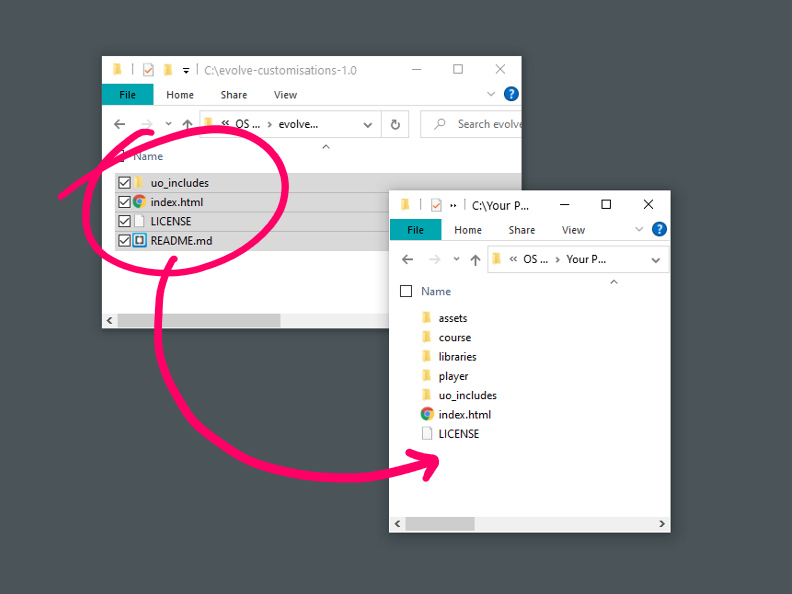
**Exporting a course from Evolve ordinarily results in a zip downloaded that is ready to use. This process would require unzipping it, adding some files, and then zipping it up again. This isn’t a big deal for the team, but adds frustrating complexity for the client.
(I could also mention testing here, but you should always test your courses after exporting regardless)
Minimizing the risks
The risks listed are unavoidable, but so to is the need for a custom solution in the first place, so here are the main considerations I had while building the common hacks I used in Evolve.
- **Design for modularity.
**When adding CSS or JS that would change a particular aspect, I always programmed it to be separate from everything else. This would mean that if one customisation broke, it wouldn’t affect others, and it also meant if one customisation needed to be turned off, it could be done so easily without affecting any others.
- **Comments
**I commented the code very clearly and verbosely. So even if a non-programmer had to look at it, they could do so.
- **Differentiating mandatory and optional customisations.
**Some hacks needed to be applied to every course we created, but some were course specific or simply optional. I made sure to clearly differentiate while still making any hack easy to turn on or off.
- **Documentation that doubles for testing.
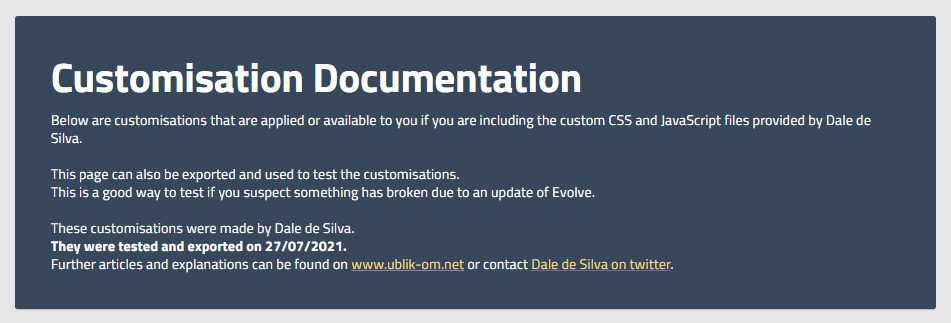
**I built a course in Evolve that documented all the customisations with examples. That meant there was one place to go to see all the customisations side by side as well as a course that could be exported just like any other to test all the customisations anytime Evolve updated.
- **Clear processes around applying and testing.
**I organised the files that would contain the customisations to make applying them super clear. I even created a guide for clients.
- **Design for graceful failure.
**Where possible, I always built courses to work in an adequate way without customisations. The customisations were then applied to modify that behaviour to exactly what we needed. This meant that if a customisation failed, and the person exporting the course didn’t notice when exporting, it would still be useable and potentially not noticable.
It’s worth noting that designing for graceful failure isn’t always the best approach. Graceful failure helps errors go unnoticed, but often what you want is the exact opposite, to make sure errors are very noticeable so that you don’t accidentally publish something without realising it has an error.
I jumped between these two, but opted for graceful failure in more instances. I chose it because I expected most people wouldn’t test comprehensively after each export — which means even if an error was super noticeable, it may still slip through the cracks, so it would be better if they weren’t noticeable.
 designdebt.club